Your First AI Beauty Analysis: What to Expect and How to Use the Results
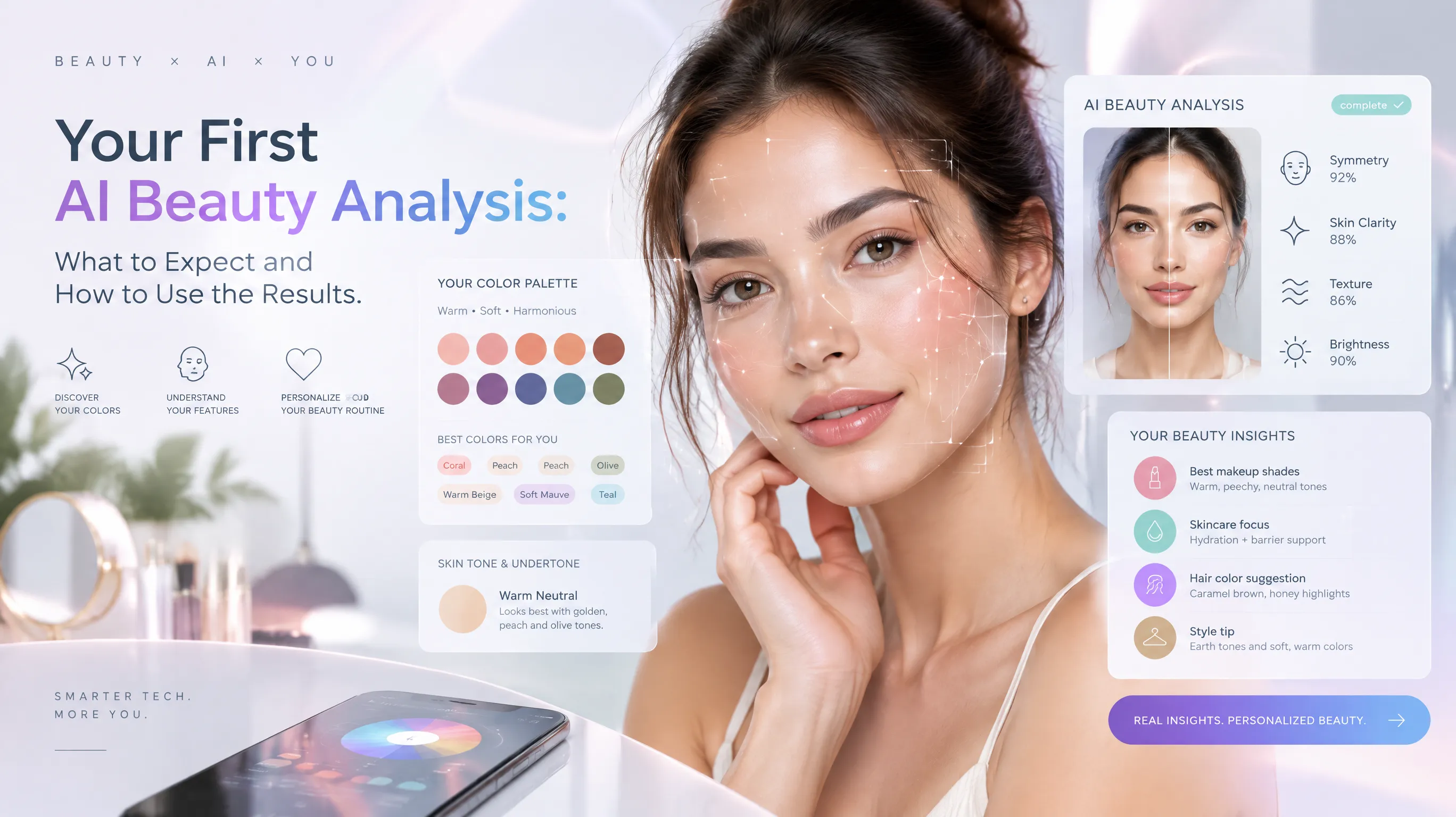
I Was Skeptical Too — Then I Actually Tried It
Let me be honest: when I first heard about "AI beauty analysis," my expectations were somewhere between a BuzzFeed quiz and a glorified Instagram filter. I figured I'd upload a selfie, get a vague result like "you're a Summer!" and move on with my life, no wiser than before.
I was wrong. Genuinely, unexpectedly wrong.
What I got back was a detailed breakdown of my skin undertone, a specific color season classification with an explanation of why, personalized makeup shade recommendations, and a curated palette of clothing colors organized by category. It took about 30 seconds. And when I tested the recommended lipstick shade at Sephora the following weekend, the sales associate asked if I'd had professional color consultation done.
I hadn't. I'd used my phone camera and an AI.
If you're curious about trying AI beauty analysis but aren't sure what to expect — or whether it's actually worth your time — this guide walks you through the entire process, from the selfie to the style changes.
What Exactly IS AI Beauty Analysis?
At its core, AI beauty analysis uses computer vision and machine learning to evaluate your physical features — skin tone, undertone, facial proportions, eye color, hair color, contrast levels — and generate personalized style recommendations based on established color theory and styling frameworks.
Think of it as a digital version of the professional color analysis consultation that used to cost $200–$500 and require an in-person appointment with a trained analyst who'd hold fabric drapes next to your face under controlled lighting.
What modern AI beauty tools typically analyze:
- Skin undertone — Whether you're warm, cool, neutral, or olive. This is the single most important factor in determining which colors flatter you.
- Color season — Your specific place in the 12-season color system (e.g., Soft Autumn, Bright Winter, True Summer). This determines your ideal palette.
- Face shape — Oval, round, square, heart, oblong, diamond. Drives recommendations for hairstyles, glasses, and earring shapes.
- Feature contrast — The difference between your lightest and darkest features. High contrast = dramatic colors work; low contrast = blended tones work better.
- Coloring characteristics — Warmth/coolness, depth (light vs deep), and clarity (bright vs muted) of your overall appearance.
The AI doesn't just spit out a label. Good tools explain the reasoning — why you're classified the way you are, and how each recommendation connects back to your specific features.
See your personal color palette now
Upload a photo — get your AI beauty report in 60 seconds.
Before You Start: Getting a Good Photo
The quality of your results depends heavily on the quality of your input photo. This isn't about looking "good" — it's about giving the AI accurate color information to work with.
Do:
- Use natural daylight. Stand near a window (not in direct sun) or step outside on a cloudy day. North-facing windows provide the most neutral, even light.
- Go makeup-free, or at minimum skip foundation. The AI needs to see your actual skin tone. Tinted moisturizer, color-correcting primers, and heavy concealer all distort the reading.
- Wear a white or neutral gray top. Colored clothing near your face can reflect onto your skin and shift the undertone reading.
- Face the camera directly with your hair down. The tool may analyze your hair color as part of the overall assessment.
- Use your phone's rear camera for better color accuracy — front cameras often apply subtle beauty filters even when you think they're off.
Don't:
- Use ring lights or warm-toned lamps. They add a yellow cast that makes everyone look warmer than they are.
- Take the photo in a bathroom with fluorescent lighting. The green tint is invisible to your eye but the AI sees it.
- Use a heavily filtered or edited photo. What's the point of analyzing yourself if the photo doesn't look like you?
- Wear statement jewelry or glasses in the photo unless you specifically want glasses frame recommendations.
I've seen people get different season results simply because they took one photo under warm kitchen light and another by a window. The technology is accurate — but garbage in, garbage out.
What Happens During the Analysis
Here's the typical flow, demystified:
Step 1: Photo Upload and Face Detection
The AI locates your face in the image and maps key landmarks — your jawline, cheekbones, forehead, eyes, nose, and lips. This isn't about judging attractiveness. It's creating a coordinate map so the system knows exactly which pixels represent your skin, eyes, hair, and lips for color sampling.
Step 2: Color Extraction
The system samples colors from multiple areas of your face — forehead, cheeks, jawline, under-eye area — to determine your skin tone and undertone. It also reads your eye color and natural hair color. These three data points (skin, eyes, hair) form your "personal coloring signature."
Step 3: Undertone Classification
Based on the extracted colors, the AI determines whether your underlying skin tone leans warm (yellow/golden/peachy), cool (pink/blue/rosy), neutral (balanced), or olive (greenish modifier on top of warm or cool). This is the step most people get wrong when trying to self-diagnose, because we tend to confuse surface redness or tanning with actual undertone.
Step 4: Season Determination
Using your undertone plus your depth (how light or dark your overall coloring is) and clarity (how bright or muted your features appear), the AI places you into one of 12 color seasons. Each season has a curated palette of colors that harmonize with your natural coloring — making your skin look clearer, your eyes brighter, and your overall appearance more vibrant.
Step 5: Personalized Recommendations
This is where the results get practical. Based on your season and features, the AI generates specific recommendations across categories:
- Best and worst clothing colors with hex codes and visual swatches
- Makeup shades — foundation undertone, lipstick families, eyeshadow palettes, blush tones
- Hair color directions — which shades to consider and which to avoid
- Metals for jewelry — gold, silver, rose gold, or mixed
- Overall styling notes — whether you look best in high contrast outfits or tonal dressing
How to Actually Read Your Results
Getting results is one thing. Understanding them is another. Here's how to make sense of what you see:
Your Color Season Isn't a Box — It's a Direction
Being classified as "Soft Autumn" doesn't mean you can only wear olive green and burnt sienna for the rest of your life. It means your coloring harmonizes most naturally with warm, muted, medium-depth colors. You still have a full palette of 40+ shades to work with — and you can absolutely wear colors outside your palette for specific effects.
Think of your season as your "home base." These are the colors that require zero effort to look good. Other colors might work too, but they'll need more intentional styling to pull off.
Pay Attention to the "Avoid" List
Ironically, the "avoid" colors are often more useful than the "best" colors. Most people have an intuitive sense of what looks good on them — but we're terrible at recognizing what's actively working against us. If the analysis flags "icy pastels" or "warm orange" as unflattering for you, mentally review your wardrobe. Chances are, the pieces you never reach for are in that zone.
The Undertone Finding Is the Most Valuable Part
If you take nothing else from the analysis, take the undertone. Knowing whether you're warm or cool immediately improves every purchase decision — foundation, concealer, lipstick, blush, clothing, jewelry. It's the single piece of information that most people lack and that makes the biggest difference.
I spent years buying "nude" lipsticks that looked weirdly orange on me. Turns out I'm cool-toned, and most "nude" shades are formulated warm. One undertone insight, years of mystery solved.
Putting Results Into Practice (Without Overhauling Everything)
The biggest mistake people make after getting their analysis is trying to revolutionize their entire wardrobe overnight. Don't. Here's a gradual, sustainable approach:
Week 1: Test With What You Own
Pull out 3-4 tops in colors from your recommended palette and wear them exclusively for a week. Notice whether you get more compliments, whether your skin looks clearer in the mirror, whether you feel more "put together." Then wear something from your avoid list and compare. The contrast is usually striking.
Week 2: Fix Your Foundation
If your analysis includes makeup recommendations, start with foundation. Getting the right undertone in your base makeup is the single highest-impact change. Ask for samples at a beauty counter in your recommended undertone family (warm, cool, neutral, olive) and test them on your jawline in natural light.
Week 3: Edit, Don't Purge
Go through your closet with your palette nearby. Don't throw anything away — just move "off-palette" items to one side. Some of these pieces might work as accent pieces, layering items, or bottoms (color near the face matters most). The goal is awareness, not a wardrobe bonfire.
Month 2+: Shop Smarter
Now that you know your palette, every future purchase becomes easier. No more standing in a store wondering "does this blue work for me?" You'll know — because you know whether you need a warm blue or a cool blue, a muted shade or a bright one. Shopping becomes faster, returns decrease, and your wardrobe develops a natural cohesion.
Common Questions and Honest Answers
"Can AI really be as accurate as a professional analyst?"
For the majority of people, yes. Multiple comparison studies show that AI and professional analysts agree on the season classification around 85% of the time. The main area of disagreement is with people whose coloring sits right on the border between two seasons — but honestly, professional analysts disagree on borderline cases too. No system is perfect, but AI has the advantage of consistency and objectivity.
"What if I don't agree with my results?"
Try the recommended colors before dismissing them. Our perception of what "looks good" is heavily influenced by habit and the colors we've always worn. I was convinced I looked best in black until my analysis pointed out that deep navy and charcoal were infinitely more flattering — and when I tried them, it was obvious. Black was just what I was used to.
"Do results change over time?"
Your core undertone doesn't change, but your depth and clarity can shift with age, sun exposure, or major hair color changes. It's worth re-analyzing every 2-3 years or after significant changes to your appearance. Many AI tools, like those at aicoloranalysis.io, make this easy since you can just snap a new photo.
"Is this just for women?"
Not at all. Color analysis principles apply equally to men — the same undertone and season framework determines which shirt colors, tie shades, and suit tones are most flattering. The growing trend of men's style consultations proves there's significant demand. A navy suit and a charcoal suit might both be "dark and professional," but one will make your skin glow and the other will make you look tired.
What Different Analysis Types Tell You
One of the things that surprised me about modern AI beauty tools is how many analysis types exist beyond basic color season typing. Here's a quick overview of what's available and when each is most useful:
| Analysis Type | What It Tells You | Best For |
|---|---|---|
| Personal Color Analysis | Your 12-season type and full color palette | Foundation of all styling decisions |
| Makeup Analysis | Specific product shade recommendations | Shopping for cosmetics |
| Face Shape & Hairstyle | Your face shape + flattering cuts | Before a haircut appointment |
| Hair Color Preview | How different shades look on YOUR face | Before a salon color session |
| Outfit Color Matching | Clothing colors ranked by how they affect your complexion | Wardrobe building |
| Glasses Recommendation | Frame shapes and styles for your face | Buying new glasses or sunglasses |
| Jewelry & Accessories | Best metals, gemstone colors, earring styles | Gift wishlists and jewelry shopping |
| Style Personality | Your style archetype and signature look direction | Defining your personal aesthetic |
You don't need to do all of these at once. Start with personal color analysis — it's the foundation everything else builds on. Then branch into whichever category is most relevant to your life right now.
Key Takeaways
- AI beauty analysis evaluates your skin undertone, color season, face shape, and feature contrast to generate personalized style recommendations
- Photo quality matters enormously — use natural daylight, skip makeup, and wear a neutral top for the most accurate results
- Your color season is a direction, not a prison — think of it as your styling home base with room for personal expression
- The undertone finding is the single most valuable insight for everyday purchasing decisions
- Start small: test recommended colors with what you already own before making any big wardrobe changes
- Modern AI tools cover far more than just color — from glasses frames to hairstyles to jewelry metals, the technology has expanded into a comprehensive styling ecosystem
The era of guessing what looks good on you is genuinely ending. Whether you're someone who's always felt confident about your style or someone who's spent years feeling vaguely "off" without understanding why, getting an objective analysis of your coloring is like being handed the answer key. You can still ignore it if you want — but at least you'll be making informed choices rather than shooting in the dark.
Related Articles
- AI vs Professional Color Analysis: I Tried Both — Honest comparison of cost, accuracy, and experience
- The Science Behind Personal Color Analysis — How color theory and skin science actually work together
- The Complete Guide to the 12 Color Seasons — Deep dive into every season type
- The Best Makeup Colors for Every Color Season — Practical shade chart for all 12 seasons
Want to try AI color analysis yourself?
Upload one photo and get a magazine-level beauty report in 60 seconds.
Start Free Analysis